# HA / CLUSTER
# Keepalived HA
Nous avons setup un Keepalived pour les base de donnée avec une VIP (virtual adresse IP), pour qu'en cas de shutdown sur la base de donnée MAITRE, le standby reprennent directement le rélais
Configuration numéro 1, MAITRE dans /etc/keepalived/keepalived.conf[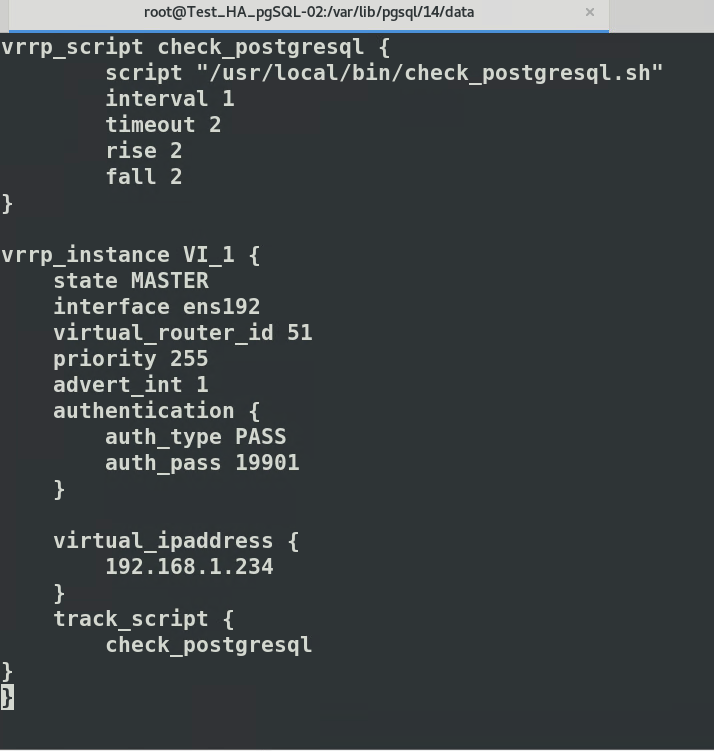](https://cavallone.fr/uploads/images/gallery/2024-10/5xoMmzl8MCRNOGNZ-image.png)
Configuration numéro 2, SLAVE dans /etc/keepalived/keepalived.conf
[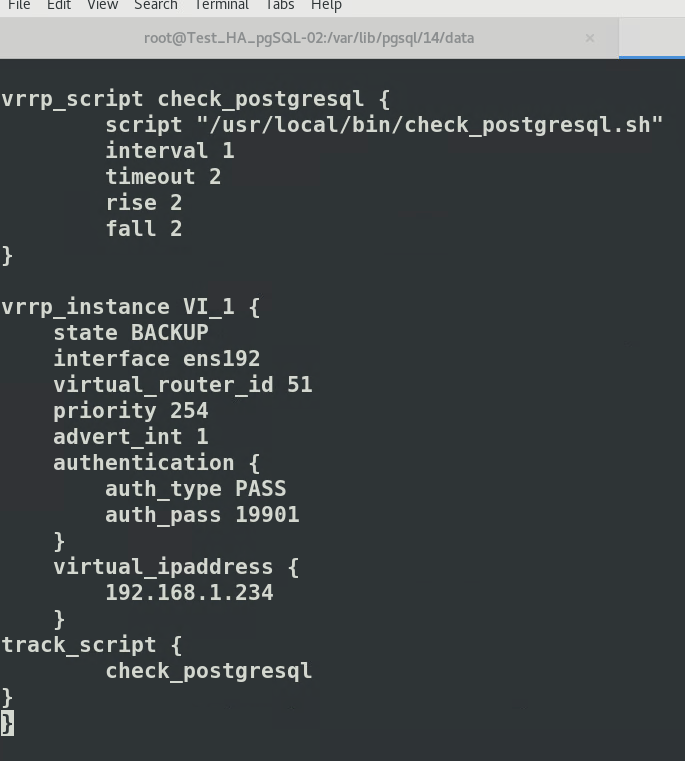](https://cavallone.fr/uploads/images/gallery/2024-10/oVQoAhn8kDHeDdHP-image.png)
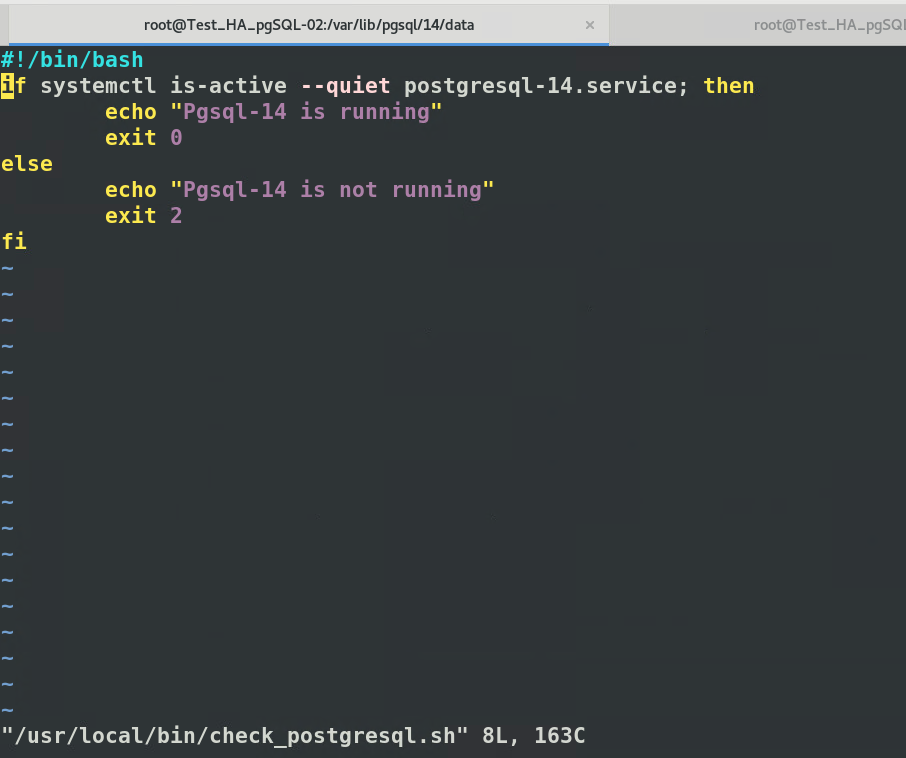
Nous avons focaliser notre flipping de VIP sur le service Pgsql14 via script :
Si il est down sur le maitre, il partira sur les intervalle définit dans le fichier de conf sur le slave.
La BDD sera donc hautement disponible le tant de débuger le nœud 1
[](https://cavallone.fr/uploads/images/gallery/2024-10/QRQbeCzdatcIiDc3-image.png)
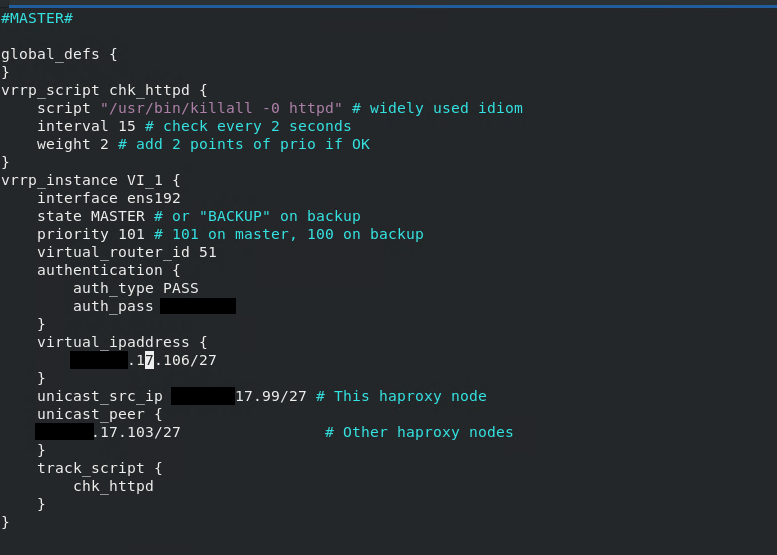
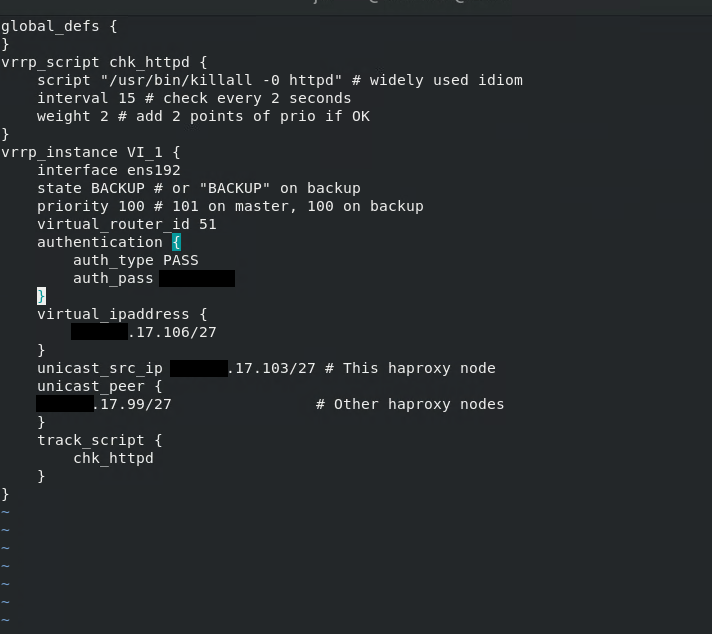
Une meilleur config pour apache 1 / master – check sur le service httpd.
[](https://cavallone.fr/uploads/images/gallery/2024-10/uAgK91ZbQwCUH85v-image.png)
Une meilleur config pour apache 2 / backup – check sur le service httpd.
[](https://cavallone.fr/uploads/images/gallery/2024-10/50xy5DfL4iDloUNO-image.png)
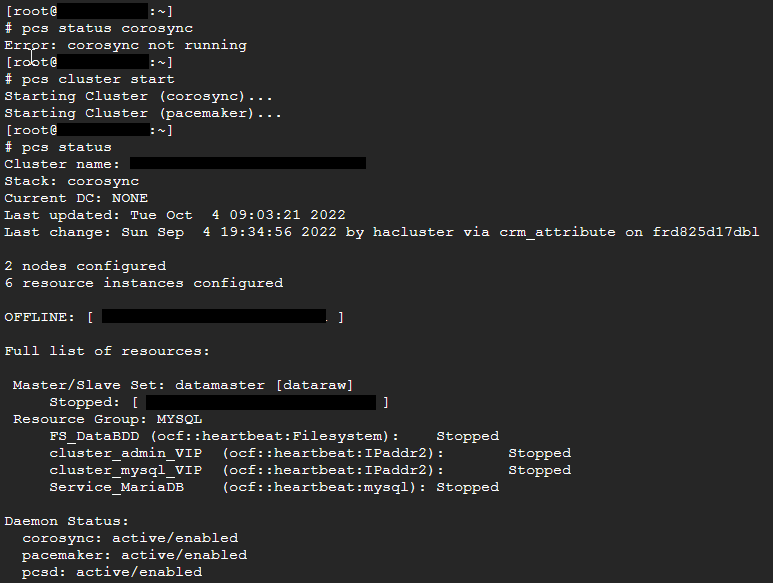
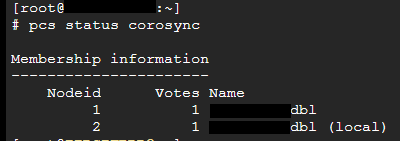
# Verifier l'état d'un cluster sous PaceMaker
[](https://cavallone.fr/uploads/images/gallery/2024-10/qAMgl7mXZOkuidT5-image.png)
[](https://cavallone.fr/uploads/images/gallery/2024-10/4Ou5pc78vSnBLQMF-image.png)
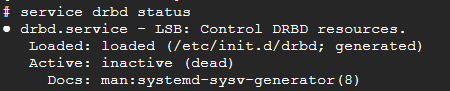
Pour l'alerte suivante : App-DRBD-Monitor --> DRBD: 1 crit, 0 okay:
Le service drbd ne doit pas être démarré manullement : il est géré par pacemaker via les commandes pcs
[](https://cavallone.fr/uploads/images/gallery/2024-10/fM5idsYBQwBL2TL0-image.png)
Identifier l'état du cluster :
drbdadm status
drbdmon (ne doit pas afficher d'alerte )
Mettre les sonde drbd en maintenance et procéder à une resynchronisation drbd
[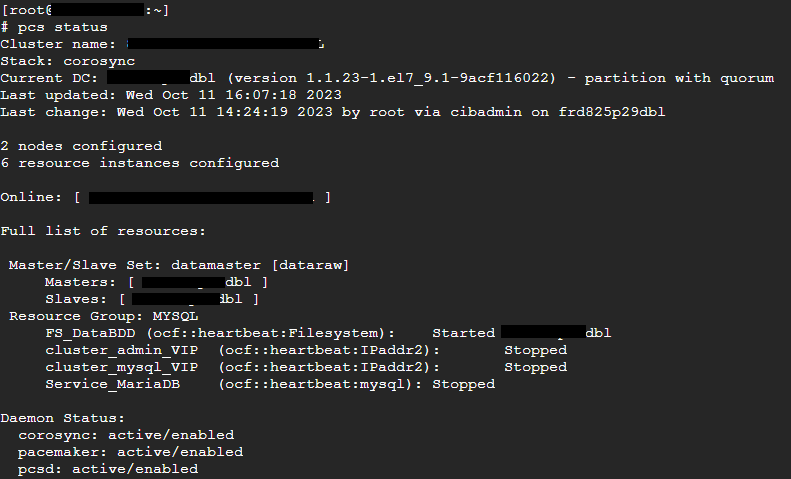](https://cavallone.fr/uploads/images/gallery/2024-10/qUsCbRID6BGifUjt-image.png)
[](https://cavallone.fr/uploads/images/gallery/2024-10/FuAytsvFMKmxWbD2-image.png)
[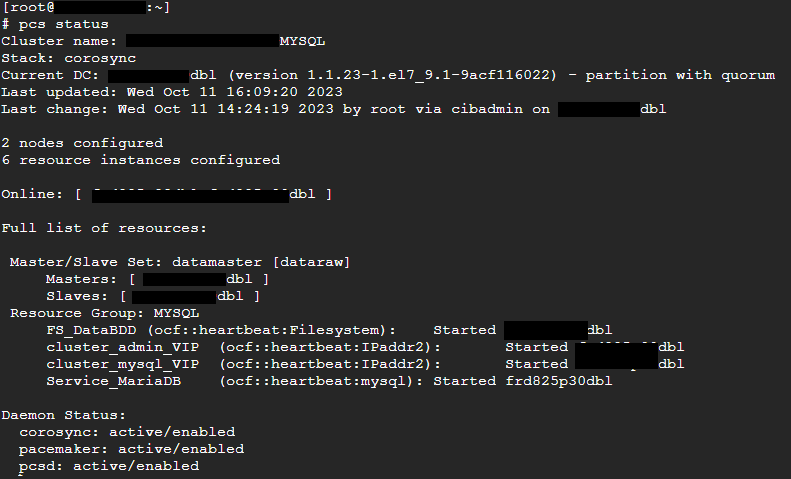](https://cavallone.fr/uploads/images/gallery/2024-10/4nFz4W7JPq8lWHCb-image.png)
Déplacement des ressoures action préreboot/maj :
Vérifier l'etat du cluster
pcs status --full drbdadm status
drbdmon (ne doit pas afficher d'alerte )
Si drbd ok: déplacer les ressources sur le nœud sur lequel il n'y aura pas d'opération pcs resource move NOM\_DU\_GROUP\_DE\_RESOURCE (exemple ci dessus : MYSQL )
Vérifier le déplacement des resource avec pcs status mettre le nœud secondaire (sur lequel on va faire la mise à jour ou le reboot) en maintenance
pcs node maintenance nomdunoeud
mettre ensuite le nœud en standby
pcs node standby nomdunoeud
procéder aux opérations de maintenance
# Correction d'erreur drbd resynchronisation de la réplication
Correction d'erreur drbd resynchronisation de la réplication :
Identifier le noeud maitre
pcs status --full
mettre le nœud secondaire en maintenance avec pcs
pcs node maintenance nomdunoeudpcs
Identifier la ou les ressources drbd avec la commande :
drbdadm dump
sur le nœud secondaire invalider les données de réplication drbd pour chacune des ressources :
drbdadm invalidate Nom\_de\_ressource\_drbd
Sur le nœud primaire préparer pour une resynchronisation forcée
drbdadm invalidate-remote Nom\_de\_ressource\_drbd
Sortir le nœud secondaire de maintenance
pcs node unmaintenance nomdunoeudpcs
Vérifier la synchronisation drbd sur les deux nœud avec d'un coté :
drbdmon
et sur l'autre nœud:
watch -n1 drbdadm status
# HAproxy.conf
Config sur les machines proxy
[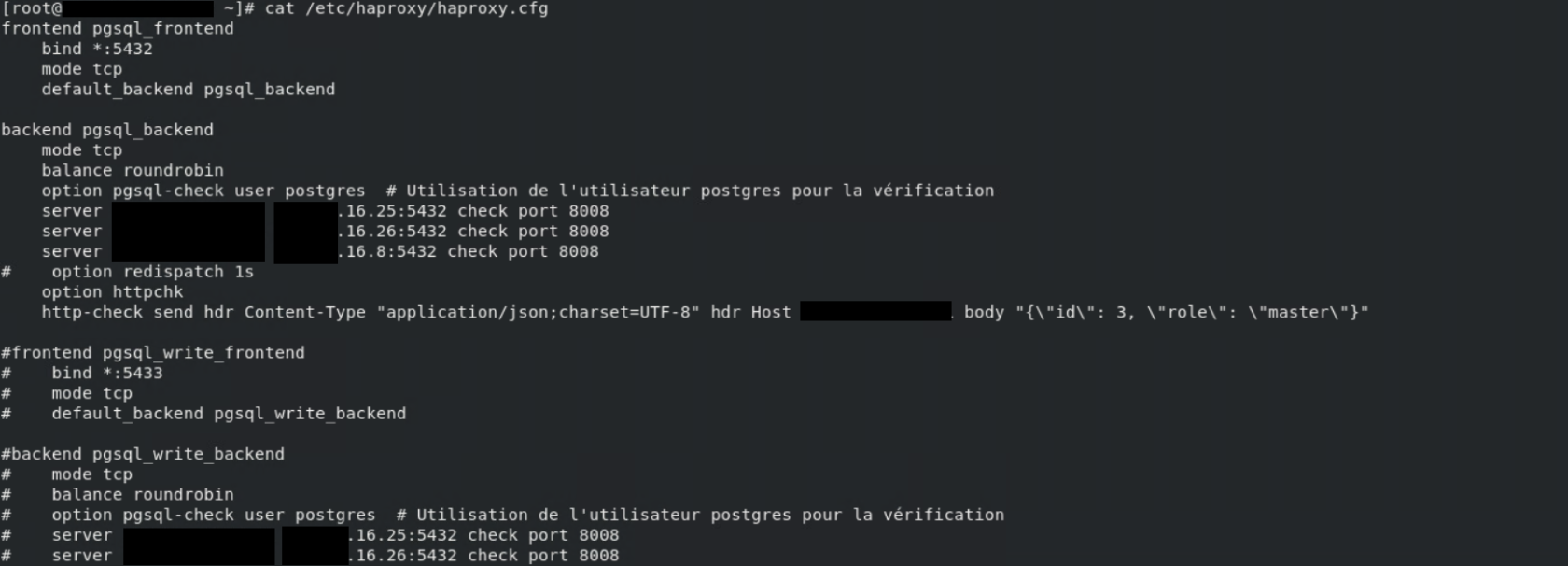](https://cavallone.fr/uploads/images/gallery/2024-10/fqfNQ3cvR0QKSrn4-image.png)
Format json pour vérification :
[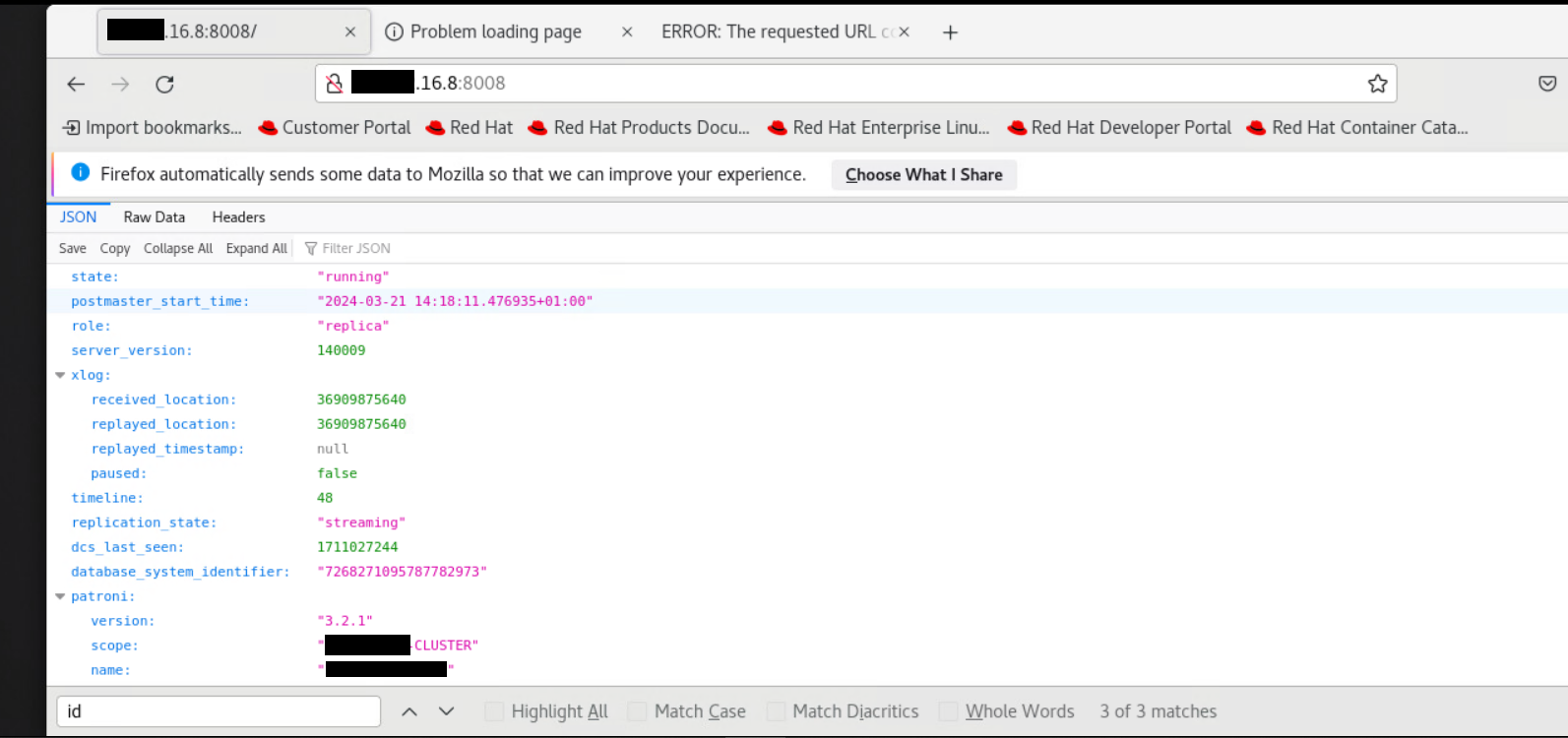](https://cavallone.fr/uploads/images/gallery/2024-10/asIXArEBgmYnA77d-image.png)
# Commande Tshoot Cluster NFS/PACEMAKER/COROSYNC
lors de l'installation de votre cluster il faut que cette requête soit en état OK sur les 2 nœuds sinon votre cluster ne basculeras pas, j'ai eu le problème sur mes proxy ouvert, j'ai du les désactivé pour que la bascule fonctionne:
curl -k https://\*\*\*\*\*.fr:2224/remote/status/
Commande pour cleanup vos ressource si elles sont KO:
crm\_resource --cleanup -r p\_drbd\_ha\_nfs
crm\_resource --cleanup -r p\_fs\_drbd1
Commande pour disable ou remettre un noeud dans le cluster:
sudo pcs cluster standby <nom\_du\_nœud>
sudo pcs cluster unstandby <nom\_du\_nœud>
disable les ressource sur un noeuds isolé:
pcs resource disable p\_exportfs\_openshift\_prod
pcs resource disable p\_exportfs\_prod
pcs resource disable p\_nfsserver
pcs resource disable p\_fs\_drbd1
pcs resource disable p\_drbd\_ha\_nfs
crm\_resource --resource p\_drbd\_ha\_nfs --node \*\*\*\*.fr --demote
réactiver les ressource sur un noeuds isolé:
pcs resource enable p\_drbd\_ha\_nfs
pcs resource enable p\_fs\_drbd1
pcs resource enable p\_nfsserver
pcs resource enable p\_exportfs\_prod
pcs resource enable p\_exportfs\_openshift\_prod
crm\_resource --resource p\_drbd\_ha\_nfs --node \*\*\*\*.fr --promote
deconnecter ou connecter drbd sur le noeud isolé
drbdadm disconnect ha\_nfs
sudo drbdadm connect ha\_nfs
Forcer la synchronisation avec les données du nœud primaire
drbdadm connect --discard-my-data ha\_nfs
Status du drbd
drbdadm status
# Script de Nettoyage ressource sur un cluster NFS
Script à appliquer sur une crontab de 24h pour effectuer un nettoyage de vos ressource, si le NFS est consommé fréquemment, toujours choisir la première ressource de votre cluster cela nettoieras le reste à la suite peu importe le nombre de ressource derrière, le script rajoute un print sur des logs si cela a bien fonctionner :
```bash
#!/bin/bash
# Variable pour le fichier de log
LOG_FILE="/var/log/cleanup_p_drbd_ha_nfs.log"
# Bloc conditionnel pour exécuter le nettoyage
if sudo crm_resource -cleanup -r p_drbd_ha_nfs && sudo crm_resource -cleanup -r p_exportsfs_pprod; then
# Si les deux commandes se sont exécutées avec succès
echo "$(date +'%Y-%m-%d %H:%M:%S') - Clean up successful" >> "$LOG_FILE"
else
# Si au moins une des commandes a échoué
echo "$(date +'%Y-%m-%d %H:%M:%S') - Clean up failed" >> "$LOG_FILE"
fi
```
# Patroni cluster
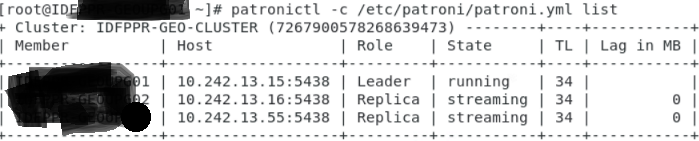
Lister un cluster patroni :
patronictl -c /etc/patroni/patroni.yml list
[](https://cavallone.fr/uploads/images/gallery/2024-11/GDZW0o1on0qB2iXb-image.png)