# Augmentation Disque Linux avec LVM

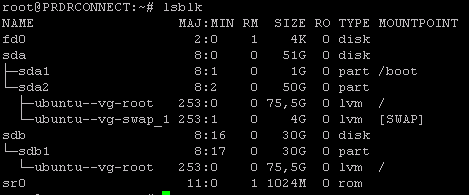
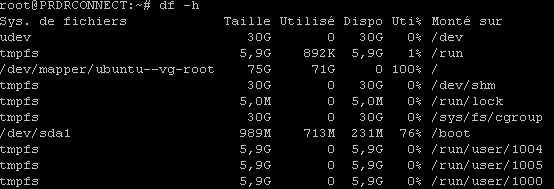
Augmentation espace disque Linux sur SERVER par exemple :

[![image.png](https://cavallone.fr/uploads/images/gallery/2024-10/scaled-1680-/gdym6WnFYxZ2wg3o-image.png)](https://cavallone.fr/uploads/images/gallery/2024-10/gdym6WnFYxZ2wg3o-image.png)

<p class="callout info">Partition Racine pleine à 100%.</p>

[![image.png](https://cavallone.fr/uploads/images/gallery/2024-10/scaled-1680-/4pDuRZ93PefFj4Hs-image.png)](https://cavallone.fr/uploads/images/gallery/2024-10/4pDuRZ93PefFj4Hs-image.png)

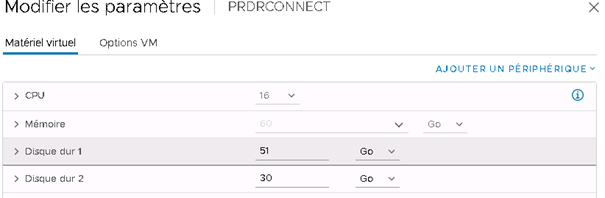
Augmenter la taille du deuxième disque dans Vmware:

[![image.png](https://cavallone.fr/uploads/images/gallery/2024-10/scaled-1680-/JS3R9rSkY1HtuZWY-image.png)](https://cavallone.fr/uploads/images/gallery/2024-10/JS3R9rSkY1HtuZWY-image.png)  
  
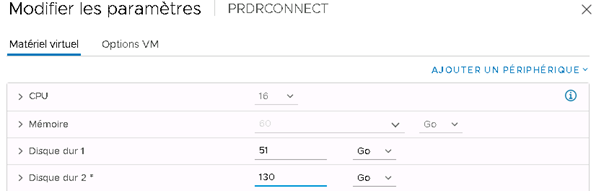
Après ajout :

[![image.png](https://cavallone.fr/uploads/images/gallery/2024-10/scaled-1680-/jfQQvT0HA4z7xUiI-image.png)](https://cavallone.fr/uploads/images/gallery/2024-10/jfQQvT0HA4z7xUiI-image.png)
Puis prendre un snapshot du serveur.  
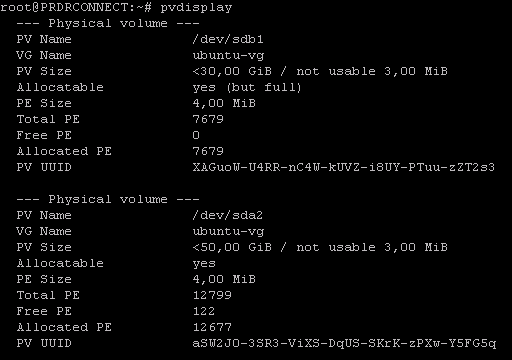
<span style="color: rgb(230, 126, 35);">pvdisplay</span>

[![image.png](https://cavallone.fr/uploads/images/gallery/2024-10/scaled-1680-/srzllWauFq3CYdWJ-image.png)](https://cavallone.fr/uploads/images/gallery/2024-10/srzllWauFq3CYdWJ-image.png)

<span style="color: rgb(230, 126, 35);">ls /sys/class/scsi\_device/</span>

[![image.png](https://cavallone.fr/uploads/images/gallery/2024-10/scaled-1680-/IE1LjPbrMJkiFkld-image.png)](https://cavallone.fr/uploads/images/gallery/2024-10/IE1LjPbrMJkiFkld-image.png)

<span style="color: rgb(230, 126, 35);">echo 1 &gt; /sys/class/scsi\_device/2\\:0\\:0\\:0/device/rescan</span>  
<span style="color: rgb(230, 126, 35);">echo 1 &gt; /sys/class/scsi\_device/32\\:0\\:0\\:0/device/rescan</span>  
<span style="color: rgb(230, 126, 35);">echo 1 &gt; /sys/class/scsi\_device/32\\:0\\:1\\:0/device/rescan</span>

  
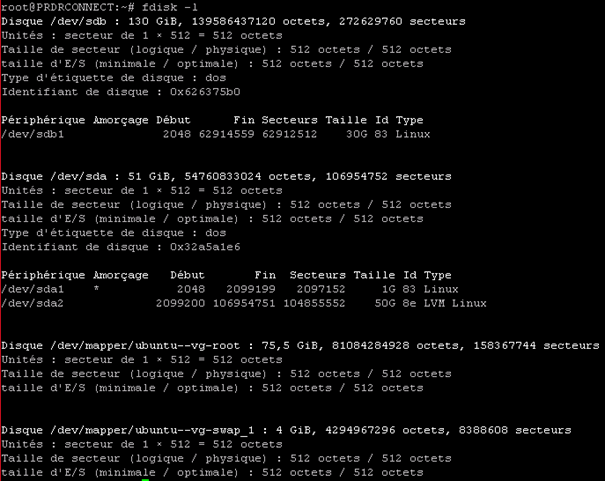
<span style="color: rgb(230, 126, 35);">fdisk -l</span>

[![image.png](https://cavallone.fr/uploads/images/gallery/2024-10/scaled-1680-/udBNKSVZz85DC0kM-image.png)](https://cavallone.fr/uploads/images/gallery/2024-10/udBNKSVZz85DC0kM-image.png)

<span style="color: rgb(230, 126, 35);">pvscan</span>

[![image.png](https://cavallone.fr/uploads/images/gallery/2024-10/scaled-1680-/BZfD8L4i7TrSg030-image.png)](https://cavallone.fr/uploads/images/gallery/2024-10/BZfD8L4i7TrSg030-image.png)

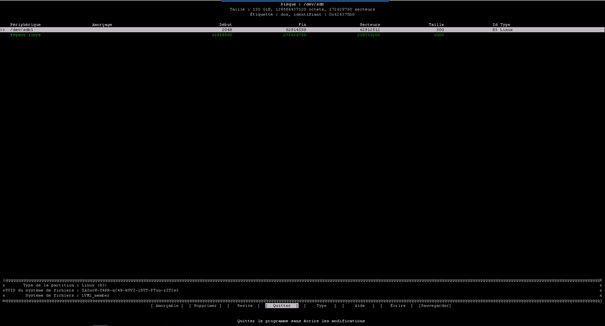
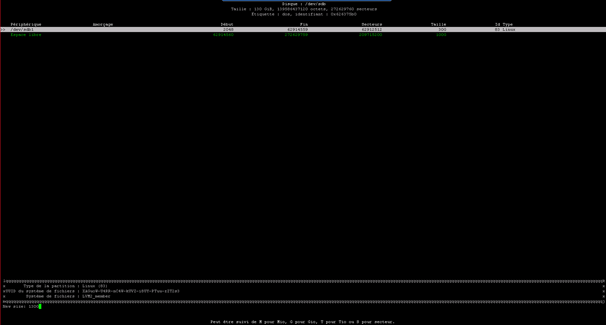
<span style="color: rgb(230, 126, 35);">cfdisk /dev/sdb</span>

[![image.png](https://cavallone.fr/uploads/images/gallery/2024-10/scaled-1680-/xrvQxgANPOyTsQYZ-image.png)](https://cavallone.fr/uploads/images/gallery/2024-10/xrvQxgANPOyTsQYZ-image.png)  
  
Resize puis faire entrée

[![image.png](https://cavallone.fr/uploads/images/gallery/2024-10/scaled-1680-/3S3xcw4uz0nMD7uG-image.png)](https://cavallone.fr/uploads/images/gallery/2024-10/3S3xcw4uz0nMD7uG-image.png)
[![image.png](https://cavallone.fr/uploads/images/gallery/2024-10/scaled-1680-/qYEMwdMREuRQGz81-image.png)](https://cavallone.fr/uploads/images/gallery/2024-10/qYEMwdMREuRQGz81-image.png)  

Sélectionner Ecrire et saisir oui

[![image.png](https://cavallone.fr/uploads/images/gallery/2024-10/scaled-1680-/jRbaVUowsXVVVJ1D-image.png)](https://cavallone.fr/uploads/images/gallery/2024-10/jRbaVUowsXVVVJ1D-image.png)  

Quitter

  
Partprobe

<span style="color: rgb(230, 126, 35);">Pvscan  
</span>[![image.png](https://cavallone.fr/uploads/images/gallery/2024-10/scaled-1680-/ZvY12r4vIEJGXmAD-image.png)](https://cavallone.fr/uploads/images/gallery/2024-10/ZvY12r4vIEJGXmAD-image.png)

[![image.png](https://cavallone.fr/uploads/images/gallery/2024-10/scaled-1680-/JAWMuOIRsPjhcg2j-image.png)](https://cavallone.fr/uploads/images/gallery/2024-10/JAWMuOIRsPjhcg2j-image.png)
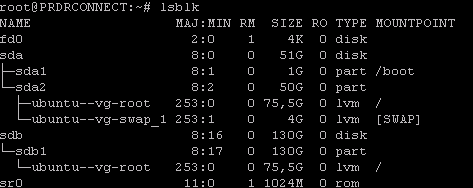
<span style="color: rgb(230, 126, 35);">pvresize /dev/sdb1</span>

[![image.png](https://cavallone.fr/uploads/images/gallery/2024-10/scaled-1680-/8JhQLMiYrtzTkTG1-image.png)](https://cavallone.fr/uploads/images/gallery/2024-10/8JhQLMiYrtzTkTG1-image.png)

<span style="color: rgb(230, 126, 35);">Pvs</span>

[![image.png](https://cavallone.fr/uploads/images/gallery/2024-10/scaled-1680-/AdfVI0SdJLfI3ckX-image.png)](https://cavallone.fr/uploads/images/gallery/2024-10/AdfVI0SdJLfI3ckX-image.png)

<span style="color: rgb(230, 126, 35);">Vgs</span>

[![image.png](https://cavallone.fr/uploads/images/gallery/2024-10/scaled-1680-/PmllsSQxpJE9TaMO-image.png)](https://cavallone.fr/uploads/images/gallery/2024-10/PmllsSQxpJE9TaMO-image.png)

<span style="color: rgb(230, 126, 35);">lvs</span>

[![image.png](https://cavallone.fr/uploads/images/gallery/2024-10/scaled-1680-/q03KFl2tWIpl4jNW-image.png)](https://cavallone.fr/uploads/images/gallery/2024-10/q03KFl2tWIpl4jNW-image.png)

<span style="color: rgb(230, 126, 35);">Df -h</span>

[![image.png](https://cavallone.fr/uploads/images/gallery/2024-10/scaled-1680-/rH3BqLXkqVEaa5od-image.png)](https://cavallone.fr/uploads/images/gallery/2024-10/rH3BqLXkqVEaa5od-image.png)

<span style="color: rgb(230, 126, 35);">lvresize -l +100%FREE /dev/mapper/ubuntu--vg-root</span>

[![image.png](https://cavallone.fr/uploads/images/gallery/2024-10/scaled-1680-/7XLNPxoeVg1waH6Y-image.png)](https://cavallone.fr/uploads/images/gallery/2024-10/7XLNPxoeVg1waH6Y-image.png)

<span style="color: rgb(230, 126, 35);">Lvs</span>

[![image.png](https://cavallone.fr/uploads/images/gallery/2024-10/scaled-1680-/oQEZzQfnV0ctLiTw-image.png)](https://cavallone.fr/uploads/images/gallery/2024-10/oQEZzQfnV0ctLiTw-image.png)

<span style="color: rgb(230, 126, 35);">resize2fs -p /dev/mapper/ubuntu--vg-root</span>

[![image.png](https://cavallone.fr/uploads/images/gallery/2024-10/scaled-1680-/OxWTwDqkZIbqy1Rt-image.png)](https://cavallone.fr/uploads/images/gallery/2024-10/OxWTwDqkZIbqy1Rt-image.png)

<span style="color: rgb(230, 126, 35);">Df -h</span>

[![image.png](https://cavallone.fr/uploads/images/gallery/2024-10/scaled-1680-/897mutawleVjZWV8-image.png)](https://cavallone.fr/uploads/images/gallery/2024-10/897mutawleVjZWV8-image.png)

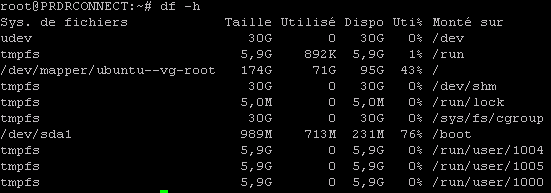
<p class="callout success">Tout est bon les volumes physiques et logiques ont été augmentés. Bravo !!!! Penser à supprimer le snapshot après.  
</p>